


You may be tempted to think that train travel is safer than air travel, but you would be wrong. According to a 2013 study, train travel is the second safest mode of transportation with 0.43 deaths per billion passenger-miles. Air travel, however, comes on top with 0.07 deaths per billion passenger miles. That’s not to say that train travel is dangerous. On the contrary, as already mentioned, train travel is the second safest transportation mode available, which is why a train accident is such a big deal as it rarely happens. Unfortunately, when they do happen, it can cost the lives of many. On today’s list we’ll take a look at 25 Worst Train Wrecks in History.
|
The Mikawashima Train Crash (Japan, 1962)
The Mikawashima train crash was a multiple train crash that happened on May 3, 1962, near Mikawashima Station in Arakawa, in Tokyo. It involved a freight train and two passenger trains and cost the lives of more than 160 people. |
 |
The Tsurumi Rail Accident (Japan, 1963) Only a year after the Mikawashima train crash, Japan faced the Tsurumi rail accident that occurred between Tsurumi Station and Shin-Koyasu Station on the Tōkaidō Main Line in Yokohama, about twenty miles south of Tokyo. In this incident, two passenger trains collided with a derailed freight train, killing 162 people. |
 |
The Aracaju Train Crash (Brazil, 1946)
The Aracaju train crash, which occurred on March 20, 1946, was the worst-ever rail disaster in Brazil, killing 185 people and injuring three hundred more. |
 |
The Tenga Rail Disaster (Mozambique, 2002)
This rail disaster happened at Tenga, twenty-five miles northwest of Maputo, Mozambique, on May 25, 2002, causing 192 deaths and injuring 167 others. According to local authorities, the crash was a result of human error and a maneuver that went horribly wrong. |
 |
The Quintinshill Rail Crash (Scotland, 1915) This rail disaster occurred on May 22, 1915, near Gretna Green, Dumfriesshire, Scotland, at Quintinshill. The accident involved five trains, killing about 226 people and injuring 246. It remains the worst rail crash in United Kingdom’s history in terms of death toll. |
 |
The El Virilla Train Accident (Costa Rica, 1926) The El Virilla train accident occurred in Costa Rica on March 14, 1926, when an overcrowded train carrying mostly farmers and laborers derailed while crossing a bridge over the Virilla River Canyon. 248 people died and 93 were injured. It remains to this day the deadliest train accident in the country’s history. |
 |
The Igandu Train Disaster (Tanzania, 2002) The Igandu train disaster occurred during the early morning of June 24, 2002, in the African Great Lakes country of Tanzania. In one of the worst rail accidents in African history, a large passenger train with over 1,200 people on board rolled backward down a hill into a slow-moving goods train. In total, 281 people died. |
 |
The Gaisal Train Disaster (India, 1999) The Gaisal train disaster occurred on August 2, 1999, when two trains carrying 2,500 people collided at the remote station of Gaisal, 310 miles from the city of Gauhati in Assam. The crash occurred at such high speeds that the trains actually exploded on impact, killing at least 290 people. |

--------------------------------------------------------------------------------------------------------------------------
You can also JOIN US on
Following SOCIAL NETWORKS:
Like on FACEBOOK : https://www.facebook.com/fullofamazing/
Follow on TWITTER : https://twitter.com/mharisqadri
Follow Our BLOG : http://fullofamazings.blogspot.com/
Subscribe on YOUTUBE : https://www.youtube.com/channel/UCpq3x-_bSlbkbhgx92QDyfA
--------------------------------------------------------------------------------------------------------------------------
MORE AMAZING VIDEOS:
--------------------------------------------------------------------------------------------------------------------------- |
Monday, July 04, 2016
Worst Train Wrecks in History

Sunday, July 03, 2016
Dropbox launches a new way to scan documents with your phone, and other sharing features

Dropbox today is releasing a slew of new enterprise features as it continues to try to woo larger businesses in an effort to build a strong new line of business.
The most interesting new feature is probably a tool in its mobile application that allows business users to scan documents and upload them directly into Dropbox. The idea is that there is still a lot of activity and business development that happens in the real world, and Dropbox hopes to seamlessly extend that into its services.
“We all still love using analog tools, writing on white boards and using sticky notes and printed pieces of paper,” head of product Todd Jackson said. “We want to take analog info, help users get it into Dropbox, and make it more searchable and accessible.”
Here’s one of the more unique aspects: the company uses optical character recognition (or OCR, for short) to recognize text on the document that it’s scanning. That makes content within those documents — if it works — actually searchable inside the app. Given that Dropbox’s strength has generally been its core technology, and its quick synchronization tools, the company is clearly leaning on that in order to build a differentiated product.
“The way we view our job is to take all this complexity that exists in real world and get to simple, that’s what separates Dropbox from other companies,” head of product Todd Jackson said. “We sweat the details, launching new features and products is just table stakes. The hard part is how you integrate into workflows and help make work simple.”
There are plenty of use cases for something like this. A lot of design happens on real-life media and in conference rooms, for example. But all that information has to be stored somewhere, eventually, and be easily accessible. If Dropbox can make that experience more seamless, it might find a user base that rapidly adopts the technology in favor of traditional flatbed scanners — or, worse, huge binders full of documents.
Starting off, the scanner — and other tools — will be available for iOS users. The tools aren’t on Android just yet, and the company didn’t have a direct response as to when they might be available to Android users.
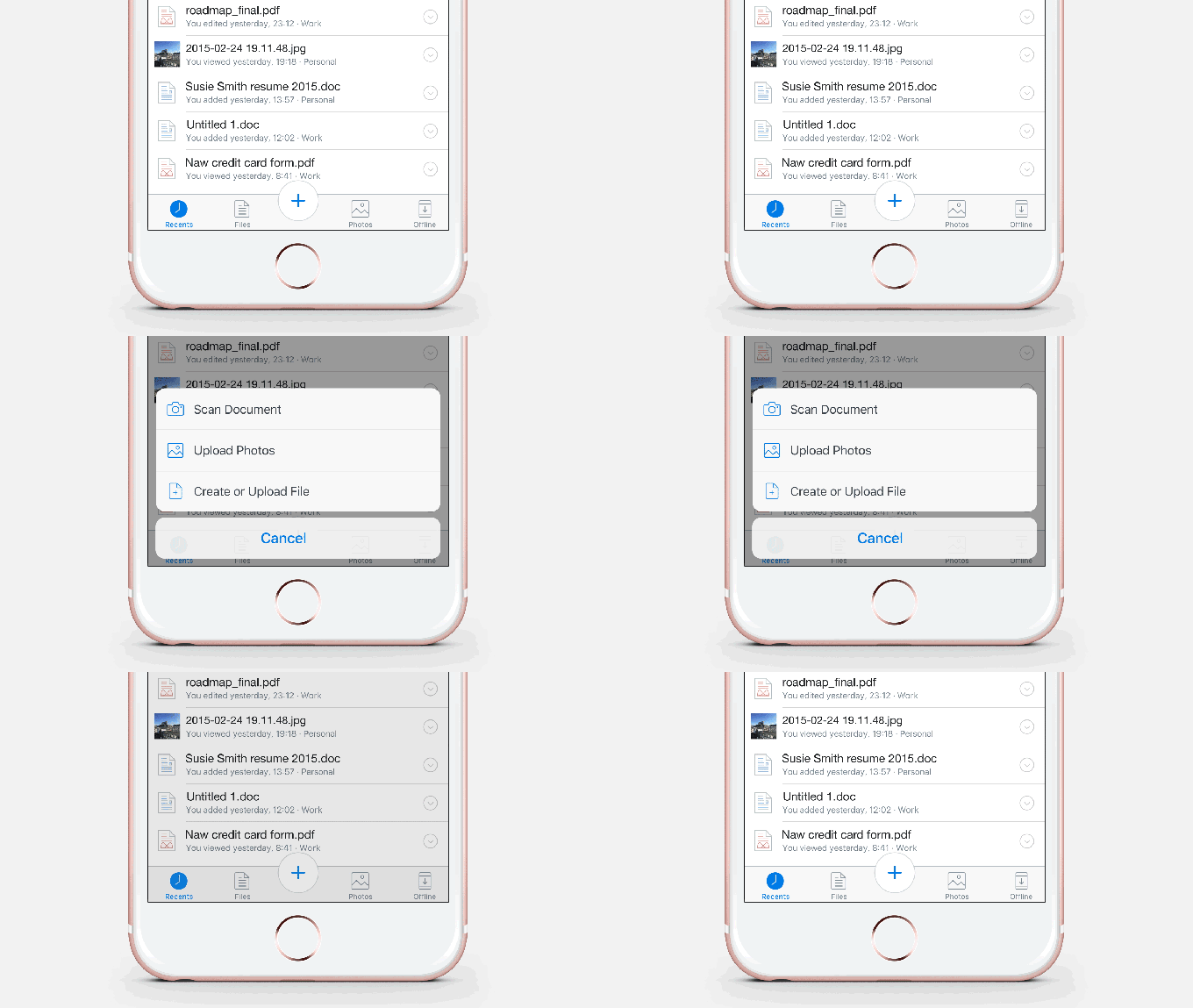 The company is releasing a slew of other features for its business customers, as well. One is a big “plus” button at the bottom of the app, placed front and center in the same way Instagram’s photo button is placed, that’s used to make new Office documents. From the app, users can create Word, PowerPoint or Excel documents. Users can also import those documents they scanned into the Office documents.
Another feature available today is the ability to view previews of previous versions of documents. That, in theory, makes it easier for business customers to review which versions of documents they want to revert to without having to revert to each one, one by one, to find the base case they are looking for after iterating on it a lot. One new tools, which aren’t available yet, are the ability to add area-specific comments to documents, as well as the ability to share view-only folders.
All of these are basically built out to make Dropbox a more rich enterprise experience. And for good reason: Basic online storage is becoming commoditized, especially as companies like Apple and Google are ever-increasing the free storage they offer to their users. So Dropbox has had to make a pivot of sorts (though it is still finding new features for its basic users) to building robust tools for enterprise customers in order to generate new business for the company.
It’s a tricky balance, however. There’s an enormous amount of competition in the space, whether that’s Box’s collaboration tools or simply going with Microsoft’s tools — though there are a lot of integrations into Dropbox, and the company focuses on finding ways to work with those companies rather than directly compete. Nonetheless, Dropbox faces an uphill battle convincing enterprise customers to adopt its tools.
Dropbox has found itself in an interesting position. Its customer base has traditionally been geared toward traditional consumers, but some of its recent consumer apps — like Carousel and Mailbox — have been whiffs and the company has had to do some soul-searching on which tools it wants to focus. The user implications for tools like these are obvious, and the market is certainly large, but the question is whether they’ll find widespread adoption in businesses.
The company says it has 500 million registered users, and Jackson was quick to note that it already has a sizable presence in larger businesses. Dropbox has said it has around 150,000 paying enterprise customers, and a majority of the Fortune 500 are currently using Dropbox in some fashion (including the free services), Jackson said.
There’s another challenge here: convincing much larger businesses, which traditionally move very slowly, to adopt these tools. It appears the bet is by making it simple for potential customers, it’ll attract attention from both the bottom up and top down. That’s going to basically be a core requirement for Dropbox’s new products to find widespread adoption. Dropbox has also made some other novel moves recently migrating its data to its own infrastructure. Jackson said that the move hadn’t necessarily had a large impact on the company’s relationship with businesses.
“That’s certainly been great for Dropbox in terms of business model, I don’t know that our business customers really feel one way or the other,” he said. “They trust Dropbox to keep their data safe.”
That’ll be important for the company as it continues to move forward. There’s a huge question mark for CEO Drew Houston, and whether he’ll be able to build a strong sustainable business given the commoditization of online storage. Houston said earlier this month at the Bloomberg Technology conference the company had become cash-flow positive, though that definition is certainly going to be scrutinized in multiple ways by Silicon Valley observers.
ATM Skimming: A guide to keeping your ATM credentials safe
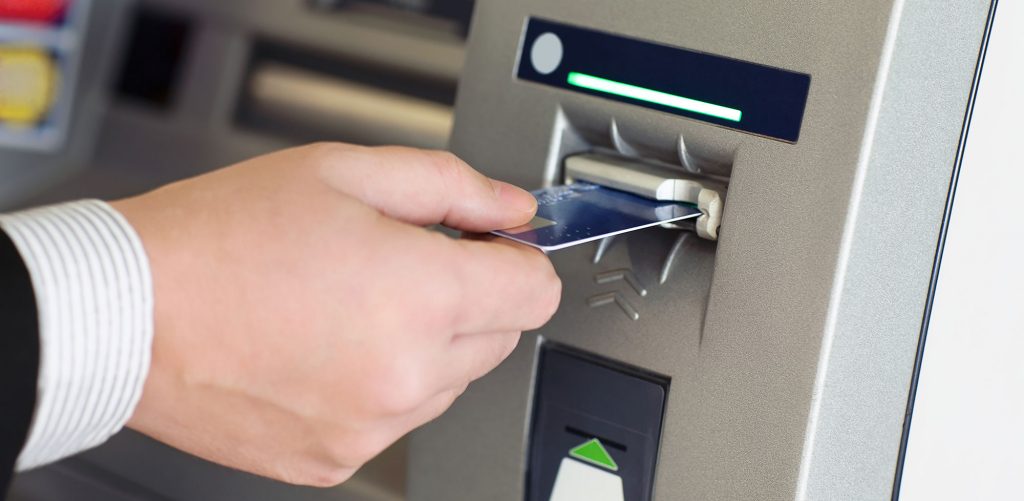
Do you know that you might be giving your credentials to a criminal without even knowing?
What is ATM Skimming?
Simply speaking, ATM skimming is the theft of identity carried out through the use of devices known as skimmers. Thieves install these devices directly into the machine to steal personal information right from your card.
What is a skimmer?
A skimmer is a card reader that catches data from a card’s magnetic stripe (found on the back on your ATM card) when you operate the machine. The device looks almost completely identical to the actual card slot found in the ATM machine. This is done to camouflage the device so that the user does not know there is anything suspicious. The skimming device has a built-in memory card for storing your credentials.
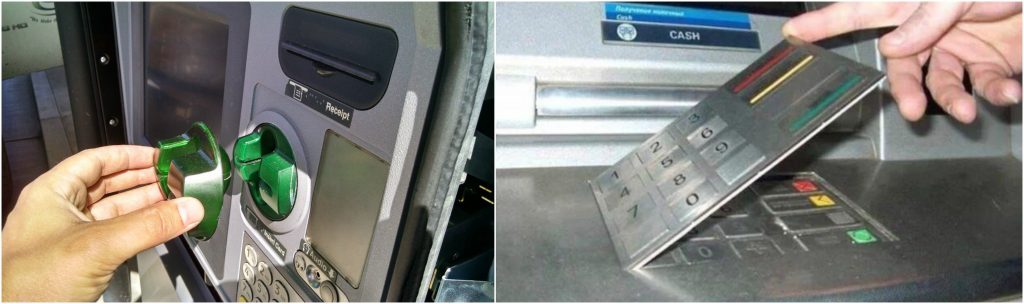
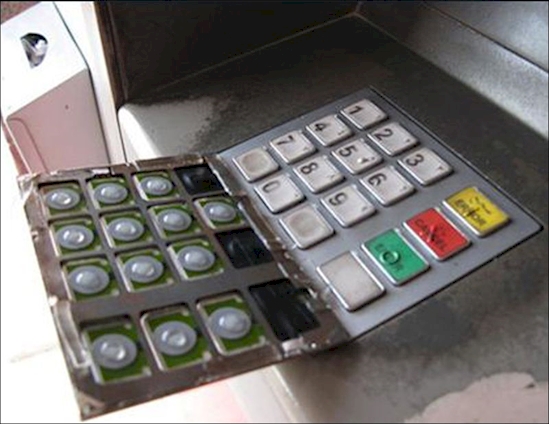
A skimmer is always used with another monitoring device such as a fake keypad or camera. These monitoring devices are used for capturing your PIN when you enter it for making a transaction through your bank account.
How do they do it?
Let’s break the procedure of ATM skimming down into easy steps that everyone can understand:
- The thief installs the skimmer onto the actual card slot and ensures that it looks just like the original.
- Once done, the thief installs a camera on top of the ATM machine’s keypad. Alternatively, they may install a fake keypad on top of the original one (this is done less frequently because the change is noticeable in most ATMs). This completes the setup for capturing data.
- The user(s) enters their card and PIN code into the ATM machine (without realizing that it has been altered). They make the transaction normally and leave the vicinity of the machine.
- The thief, at some point later, returns to the ATM machine. He removes the skimming devices and takes them with him along with all the data that has been stored.
- The identity theft has been successful. The thief can use your credentials for making transactions* and practically emptying your bank account.
*This works with Credit Cards and Debit Cards that have online access. The hacker will use the details acquired to make online transactions only because he does not have access to your card.
How to avoid it?
Now let’s move on towards the steps you can take to avoid being scammed by a simple but effective hacking technique. Here is a list of things that you shouldalways perform before operating the ATM:
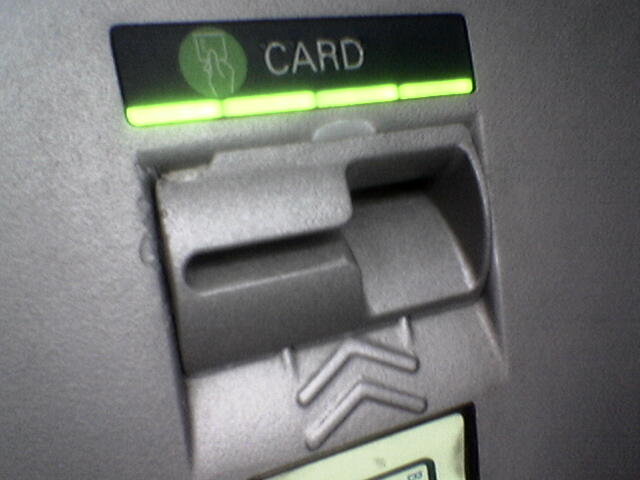
- Check the machine for tampering: Inspect the machine briefly before inserting your card. Look for obvious signs that may give away the scam. First of all, examine the card slot. Check to see if the card slot is unnecessarily thick (more than the card), aligned incorrectly, or there is NO FLASHING INDICATOR. Next, check the ATM for any other alterations that seem abnormal. Scan the keyboard and check if it is too thick or loose. If any of these signs are observed, do not operate the ATM.
- Wiggle everything: If there are no visual differences in the ATM, try pushing and pulling at things. ATMs are solidly constructed machines and they will not have loose or jiggling parts! Remember this, and pull on the card slot before you operate the machine. If it moves or wiggles at your pull, the machine has been altered. Do the same for the keyboard. Again, if anything seems normal, leave the machine.
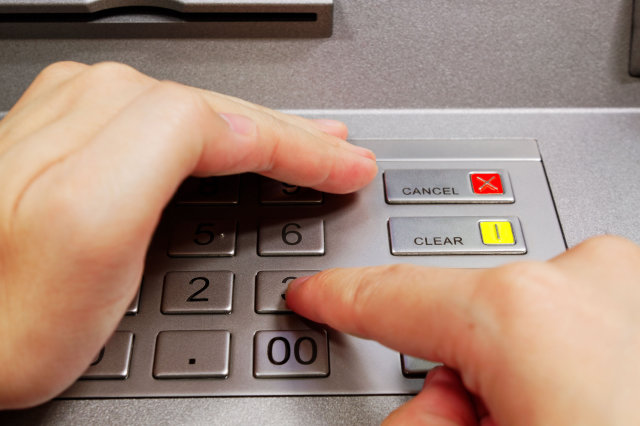
- Hide your pin: Skimming or no skimming, the thief can’t do much of anything with your card number alone. He needs the PIN to be able to use your account. It is always good practice to cover the keypad with your hand before entering your PIN. This will ensure that any hidden cameras do not capture your card’s PIN number.
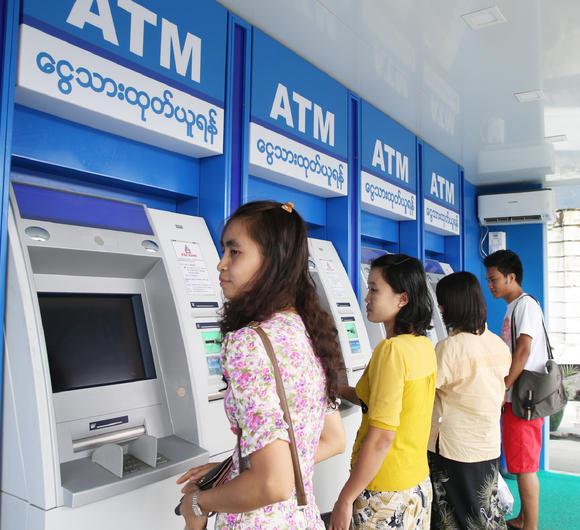
- Visit a busy ATM: Though this is not always possible, we would still advise you to look for and operate ATMs that remain busy through most parts of the day (and night). The reason is simple, the thief is less likely to perform the stunt at an ATM that is busy because the chances of getting caught are much higher.’
Keep a check on your phone notifications for transfers, payments, or withdrawals from your account. In case of any suspicious activities or transactions through your account, IMMEDIATELY inform the bank and authorities about the issue.
Bottomline: If the ATM you are operating does not feel right in any way, simply walk out and visit another machine. There is no need to take a risk. As they say, better safe than sorry.
We hope you enjoyed reading our guide, stay safe and happy banking!
We hope you enjoyed reading our guide, stay safe and happy banking!
I had never heard of Windows 10”: Woman wins suit against Microsoft for upgrading OS without permission

SAN FRANSISCO: A woman has won a lawsuit worth $10,000 against Microsoft for installing Windows 10 on her laptop without permission.
According to The Times, Teri Goldstein, who hails from Sausalito city in California, informed a court that a few days after Microsoft released Windows 10 in July 2015, the OS of her laptop at her travel business tried to update itself without permission and upon failure, it slowed down her computer, ultimately leaving it unusable.
“I had never heard of Windows 10 and neither had I asked Microsoft to install it on my computer,” she argued before the court.
She further told the judge that she had attempted to contact Microsoft’s customer support department to this effect, however, she was not given proper instructions.to fix the problem. This explains why she decided to take Microsoft to court, where she sought compensation for lost wages and the cost of a new computer.
In response, the court ordered Microsoft to pay her $10,000 as compensation for lost wages and the cost of a new computer.
Meanwhile, a spokesman for Microsoft denied any wrongdoing at the company’s end, announcing that they will not be filing any appeal against the decision as they did not want to take the legal battle any further.
SAN FRANSISCO: A woman has won a lawsuit worth $10,000 against Microsoft for installing Windows 10 on her laptop without permission.
According to The Times, Teri Goldstein, who hails from Sausalito city in California, informed a court that a few days after Microsoft released Windows 10 in July 2015, the OS of her laptop at her travel business tried to update itself without permission and upon failure, it slowed down her computer, ultimately leaving it unusable.
“I had never heard of Windows 10 and neither had I asked Microsoft to install it on my computer,” she argued before the court.
She further told the judge that she had attempted to contact Microsoft’s customer support department to this effect, however, she was not given proper instructions.to fix the problem. This explains why she decided to take Microsoft to court, where she sought compensation for lost wages and the cost of a new computer.
In response, the court ordered Microsoft to pay her $10,000 as compensation for lost wages and the cost of a new computer.
Meanwhile, a spokesman for Microsoft denied any wrongdoing at the company’s end, announcing that they will not be filing any appeal against the decision as they did not want to take the legal battle any further.
Saturday, July 02, 2016
First casualty of artificial intelligence? Self-driving car kills driver
FLORIDA – Tesla Motors on Thursday disclosed the first known death caused by a self-driving car, casting doubt over the revolutionary self-driving car technology.
According to reports, the accident occurred on a divided highway in central Florida on May 7 when a tractor trailer drove across the highway perpendicular to the Model S. Neither the driver, nor the car noticed the big rig or the trailer “against a brightly lit sky” and brakes were not applied.
The incident left 40-year-old Joshua Brown dead but the driver of the truck remained safe. He claimed that the deceased Tesla driver was watching Harry Potter at the time of accident.
The owner Tesla Motors, Elon Musk took to Twitter to condole with the family of Brown.
The National Highway Transportation Safety Administration (NHTSA) is now investigating the incident.
Subscribe to:
Posts
(
Atom
)