Hello Everyone In this Blog You Can Find about:Amazing Experiments,Amazing Tips & Tricks,Funny Videos,Health & Beauty Tips,Amazing Facts&Figures,Amazing Products Reviews,Tech News
And Many More Amazing STUFF!!!
SO STAY TUNED WITH OUR SOCIAL NETWORKS
THANKS
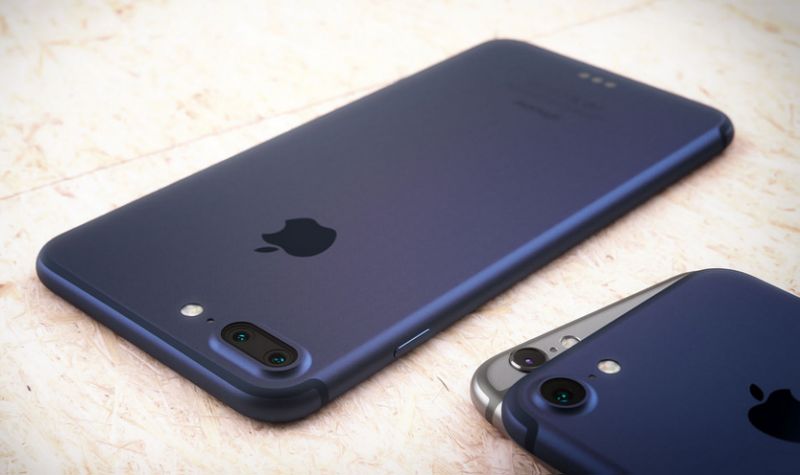
The iPhone 7 is expected to be launched about two months from now. Rumors and leaks have given us a fair idea of how the device will pan out. The latest iPhone is expected to share the design form of the iPhone 6S, with an improved camera and chipset.
The most controversial rumor yet is about the removal of the traditional 3.5 mm headphone jack in the phone. Apple will now reportedly rely on Lightning cable headphones (or alternatively, wireless headphones) instead of opting for the 3.5 mm jack. In place of the jack, the iPhone 7 is expected to feature an additional speaker grill. A capacitive Home button is also expected to be favored in place of the physical Home button found in the iPhone 6 and iPhone 6S. The primary reason for eliminating the mechanical button is because it is more prone to faults and failures.
The removal of the 3.5 mm jack and physical Home button also leads to the logical conclusion that Apple is looking forward to making the iPhone 7 waterproof and dust-proof. Removing these openings will allow the smartphone to be completely sealed, preventing damage from environmental factors such as dust and moisture.
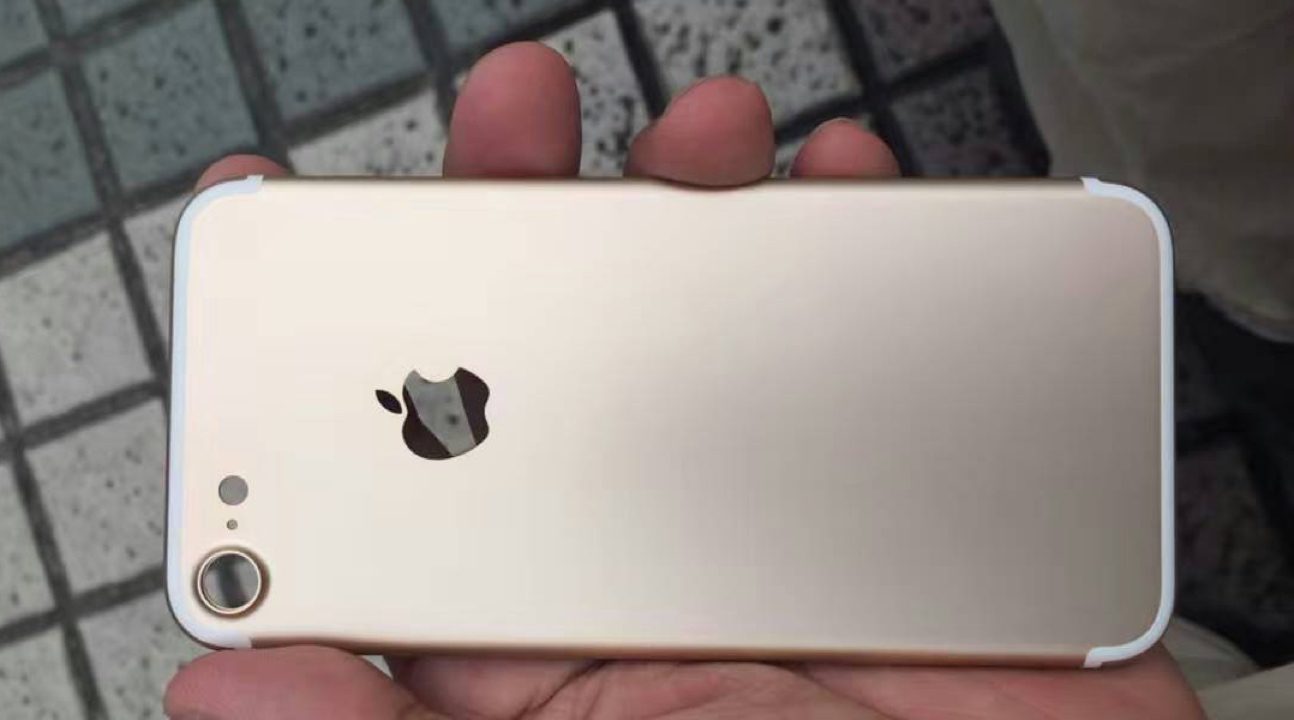
Just recently, an image of the iPhone 7’s back casing was leaked that shows the change in design. The 4.7″ iPhone 7 will feature a larger camera (approximately 25% wider) than the iPhone 6S. This will allow the sensor to take in more light to produce higher quality images. There is no news about the actual specifications of the camera, yet. The antenna lines have also been redesigned and will be present only on the top and bottom edges of the smartphone.
The new iPhone will also feature an upgraded processor and graphics chipset, likely to be the Apple A10, for improved performance. Additionally, Apple will drop the 16 GB model for the device and the base model for the iPhone 7 will feature 32 GB of internal storage.
Lastly, the iPhone 7 is also expected to launched with Deep Blue and Deep Blackcolor options instead of the traditional Space Grey color.
Following on from previous years, it is highly expected that the iPhone 7 and iPhone 7 Plus will be launched in mid-September, later this year, at a dedicated Apple event.
Source:Techjuice
Now here’s what I want YOU to do.
·Click on social sharing buttons below and share this post
with your friends, I’m sure they’ll love it!
·Comment below and let me know your VIEWS about
it.If you have any questions feel free to ask.
Building a simple, low powered electric generator can be a fun science fair project, or just a workshop experiment for a would-be engineer. The parts are simple, inexpensive, and easy to find.
Decide how large a project you are interested in building. There are design and engineering considerations that could be taken up, but for simplicity's sake, this article will give instructions for a simple, low output generator.
2
Acquire the materials you will need.The sizes and specifications can be adjusted to raise the output capacity of your generator, but this is a basic overview of the project.
22-28 ga. enameled copper wire. About 500 feet (152.4 m) will produce a modest electrical current. More "windings", coupled with a stronger magnet will increase the power output.
3 or 4 inch (7.6 or 10.2 cm) bar magnet. (Should fit lengthwise in the cardboard tube, below, with a little clearance)
1⁄4 inch (0.6 cm) diameter steel or aluminum rod, 12 inches (30.5 cm) in length.
24 inches (61.0 cm) of 1X4 lumber.
1 - large paper or cardboard tube, 4-inch (10-cm) diameter.
2 - 1/4 inch (5.7 cm) flat washers.
3
Build a "U" shaped frame to support your "rotor", ie, the permanent bar magnet mounted on a steel shaft. by
Cut the 1X4 lumber into pieces, 2, at 6 inch (15.2 cm) lengths, one at 12 inches (30.5 cm) in length.
Nail or screw the two 6 inch (15.2 cm) boards to the 12 inch (30.5 cm) board at a perpendicular angle to the 12 inch (30.5 cm) board, which is the base for the rotor frame.
4
Drill two 1⁄4 inch (0.6 cm) holes in the two uprights of your frame, aligning them so that the 1⁄4 inch (0.6 cm) rod, (the rotor shaft) will go through both without binding.
5
Drill a 1⁄4 inch (0.6 cm) hole through the center of your bar magnet, on the flat, or widest side. Be careful to measure the center both in length and width, and drill perpendicularly, so that when the shaft goes through, the magnet will be "square" to the shaft.
6
Slide the metal shaft through one side of the support frame, slide the magnet onto the shaft.
7
Cut a 4 inch (10.2 cm) section of the paper or cardboard tube. If you don't have a piece of tubing available, you can make one by rolling a sheet of construction paper into a cylinder and gluing or taping it to secure it in this shape. The ideal diameter of the tube will be just large enough to allow the bar magnet to spin freely inside the tube, keeping the magnetic field as near the copper windings as possible.
8
Wind the copper wire around the cardboard or paper tube, leaving about 16 to 18 inches (40.6 to 45.7 cm) of wire loose on each end to connect to your power test device, an electric light bulb, or other device you will supply power to. The more "turns" or winds around the tube you make, the more power your generator should produce.
9
Slide the tube over the shaft and magnet, then slide the shaft on through the other support frame. You will want several inches of the shaft sticking through each end of the frame.
10
Glue the magnet to the shaft at the center of the two supports, using a high strength hot melt glue or epoxy. You may choose to drill and tap threads into the magnet for a "set screw" if you have the tools to do so, but the idea is for the magnet to be stationary in relation to the shaft. This will be inside of the paper tube later on.
11
Support the paper cylinder with the wire windings at the center of the shaft with the bar magnet centered on the wire windings. You may simply cut cardboard legs that can be glued to the cylinder, or build a wire frame from a coat hanger or similar stiff wire to accomplish this.
12
Turn the shaft with your fingers to see if the ends of the magnet hit the inside of the tube. It must turn freely, but be as close as possible to the tube. Again, having the magnet's ends as close the copper wire windings will increase the "exciting" action of the magnetic fields the magnet produces.
13
Glue a washer on each end of the shaft outside the wood supports.
14
Attach the two wires you have loose at the ends of the windings to a flashlight bulb or other low voltage lamp, or connect the test leads from a voltmeter or multimeter to them.
15
Spin the shaft as fast as possible.You may want to wind a string around the end of the shaft as you would a toy "top", then pull it sharply, or just spin it with your fingers. You should get a small voltage, enough to light a 1.5 volt light bulb by manually spinning the shaft.
Source: Wikihow
Now here’s what I want YOU to do.
·Click on social sharing buttons below and share this post
with your friends, I’m sure they’ll love it!
·Comment below and let me know your VIEWS about
it.If you have any questions feel free to ask.
As soon as Nintendo announced it wasworking on smartphone-based games with its official first-party properties, only one word was floating in the minds of Ninty fans - Pokémon.
The 21-year-old franchise helped make the firm's handhelds true global successes, so what's to stop it going supernova on smartphones? The answer? Absolutely nada. Pokémon Go hasn't even been rolled out internationally yet and Nintendo is already struggling to deal with the sheer influx of users.
We're all obsessed with Pokémon Go here, so keep checking this guide as we add more tips and tricks while we play it.
The whole world wants to catch 'em all in this addictive augmented reality app, so to get you ahead of the game we've got ten tips to transform your smartphone into a veritable Poké portal.
If you're worried about rumours of Pokémon Go viruses, don't panic - make sure you read our guide on how to avoid Pokemon Go malware.
1. Get Pikachu as your starter Pokemon
Before you dive into the world of Pokémon Go, here's a nifty trick to get the famous electric Pokémon, Pikachu, as your starter.
Sign up for a new Pokémon Go account and choose your player character. You'll be asked by the Professor to catch a Pokémon - and this is where you usually get the chance to catch the classic stater Pokémon Charmander, Squirtle or Bulbasaur.
Instead, walk away from them (in real life), and continue to walk away from them until your phone vibrates. The three classic stater Pokémon will appear again. Walk away again, and repeat that 3 to 5 more times and Pikachu should appear - allowing you to capture him as your starter Pokémon.
2. Rustling leaves equal wild Pokemon
Pokémon Go utilises augmented reality, but that doesn't mean you'll constantly be gazing into the world through your smartphone's camera. In fact, a great deal of the game is spent traversing a virtual map of the area you're currently inhabiting.
Since the aim of Pokémon Go is to collect Pokémon and train them into new evolutions, you'll need to hunt them down out in the wild. The best visual sign that one is nearby are plumes of leaves rustling on the map. Approach these random events to try and catch it. Remember, different areas will house different types, so be sure to vary your location.
3. Master the art of capture
When you do decide to throw down with a wild Pokémon, there's just the small matter of actually bagging said creature and adding it to your growing roster.
Rather than battling a wild one as you would in a regular Pokémon game, Pokémon Go instead uses a special 'Capture' mode. The virtual world is swapped for the real one as your camera jumps into AR.
Focus your camera on the Pokémon in question and the white ring you use as a pointer will change size and colour - the smaller the ring, the more likely you'll be to capture the Pokémon.
Before you throw a Pokéball, check the colour the ring changes to - green equals easy, yellow equals moderate and red equals tough. Know these colours and you'll be on your way to mastering Pokémon Go.
4. Catch Pokemon by dropping the AR camera
Augmented reality might make for some pretty hilarious screenshots, but did you know using that particular feat makes catching Pokémon in Pokémon Go noticeably harder?
If you want to increase your chances of those Pokéball throws paying off (and avoid paying for expensive Master Pokéballs), then hit the button on the top-right of your screen that says 'AR' during Capture mode.
This will switch off your camera and take you back into the virtual Pokeworld. It certainly doesn't look as cool as seeing a Pokémon in your local park or on the beach, but it will improve catch rates.
Since the appearance of Pokémon is totally randomised in Pokémon Go (with factors such as time of day, location type and nearby landmarks all making a difference), there's a good chance you'll have the opportunity to catch more than one creature of the same type.
Naturally, you might be inclined to avoid wasting a Pokéball, but having duplicates has its uses. Extra Pokémon can be traded to Professor Willow for candy, which helps increase the stats of your best Pokémon and even helps them evolve. To do this, click the Pokéball icon, select 'Pokémon' and hit 'Transfer' by the Pokémon you want to drop.
6. Spend your Pokecoins on lures and incense
Pokémon Go being a free-to-play game means there are plenty ofmicrotransactions in place to help you fill up on items with real world cash. And whether your increase your balance with actual dollar or the defence of gyms (more on that in the steps ahead), it's how you spend that moolah that makes all the difference.
Your first thought might be to stock up on that iconic commodity - the good ol' Pokéball - but the game actually provides you with plenty of free ones. If you visit every PokéStop on your journey, they should drop them pretty regularly. Now spend those coins on far rarer items such as incense to lures.
7. Use incense to get Pokémon when not moving
Unless you're hoping to jack in your job and take up Pokémon hunting full time, there are times where you'll have to stop walking around gazing into your smartphone for rustling leaves, PokéStops and other important landmarks.
When you're stuck at your desk or at home, you'll need to use lures to attract Pokémon to you. Pokémon Go uses items such as incense to do this and they'll prove some of the most important gear in your virtual backpack. Simply hit the Pokéball at the bottom of the screen, tap 'Items' and select 'Incense' to draw those creatures in - a purple ring around your avatar will show you it's in effect.
8. Don't just win gyms - defend them
When you reach level five, the real Pokémon Go begins. Now you're at a high enough level you can begin earning in-game cash by joining one of three teams (Valor, Mystic or Instinct) and capturing or defending gyms.
Other trainers will leave some of their best Pokémon behind to defend them and you'll need to enter Combat mode to claim the territory as your own. Once you've won them back, don't forget about them like you would in a regular Pokémon game. Head back to conquered ones every day for a coin bonus, and earn even more by leaving some of your levelled up Pokémon to defend them.
9. PokeStops equal prizes
PokéStops are Pokémon Go's way of turning special landmarks in your town or city into interactive events. Visiting these special points of interest will drop random loot, including Eggs for hatching new Pokémon (see our next step for Egg hatching tips), Pokéballs for catching new ones and Potions or Revives for healing your Pokémon while in Combat mode.
Be sure to visit these PokéStops everyday if in the same area, or open the app in new areas to reap the rewards of travel. To use one, walk up close to it, tap the blue icon then swipe it to make it spin. All your randomised loot will then appear.
Here's a handy Pokémon Go tip: much like any other Pokémon game, hatching Eggs for new Pokémon is still a thing - only this time you need to monitor said Egg like aTamagotchi to expedite the process.
Hatching rates are based on how many miles or kilometres you've walked with the app open - and until the special Pokémon Go wearable is released over here this is the only way to rack up that mileage. You'll need to make sure you put the egg in an incubator so that it registers your miles as you walk.
To check the progress of your Poké ovum, tap the Pokéball, then select the Eggs menu from the list. The Pokémon that's born out of each egg is also randomised, so don't get too disappointed if you get any doubles.
11. Buy a battery pack. No, seriously
If you've read any of the coverage Pokémon Go has received recently, there's a good chance you've heard the app is a real battery killer. Since it requires you to always have it open, while accessing Wi-Fi, GPS, your camera and more, the Nintendo app will suck even the newest of batteries down to the marrow in less than half an hour.
Nintendo says it's working on a solution, but in the meantime you'll need to find alternative means. For a start, you might watch to switch off the AR component permanently and invest in a portable power pack.
If you're not in the mood to carry around an extra battery pack, you can also activate Pokemon Go's battery saver mode to prevent your handset from quickly running on empty.
Go to "Setting" in the top right corner and scroll down to battery saver. Select it and make sure it's checked. You can then turn your phone screen upside down, which will dim your display. You'll still be playing as the mode doesn't shut off the game or lock up your phone.
You'll save precious battery life, and can keep catching 'em all till your heart's content.
13. Throw a Curve ball for extra XP
Pokémon Go gives you plenty of unique ways to capture Pokémon, and this way will help you level up much faster.
When you're about to catch a Pokémon, hold down on your Poke Ball and spin it in a circular motion with your finger. This will create a curve ball, and if you hit and capture a Pokémon with this move you'll gain some extra XP.
14. Save data by using offline maps
Pokémon Go pulls map data from Google, and if you download your home and work areas on your phone via the Google Maps app it will improve the performance of Pokémon Go. You phone won't have to keep constantly redrawing your surroundings.
Open up the Google Maps app, select the Settings menu (shown by an icon with three horizontal lines) and tap on 'Offline areas'.
Press the '+' icon then use the map to drawn a square of the area you want to download, then tap on 'Download'.
This will mean you won't burn through your mobile data allowance quite so quickly, and it can help save your smartphone battery as well while you play Pokémon Go.